> For the complete documentation index, see [llms.txt](https://docs.jetadmin.io/llms.txt). Markdown versions of documentation pages are available by appending `.md` to page URLs; this page is available as [Markdown](https://docs.jetadmin.io/user-guide/sql-queries-and-api-requests/use-dynamic-sql-inputs.md).

# Use dynamic SQL inputs

Reuse a query with different values by defining inputs rather than editing the SQL each time.

## Before you start

Connect a SQL resource and open the SQL Query Builder. This example assumes an `Orders` table containing `id`, `customer_id`, and `total`. Use the table and column identifiers shown in your resource.

## Define and use an input

1. Add a numeric input named `customer_id` in the query's inputs.
2. Enter a test value, such as `1`.
3. Insert the input into the query:

```sql
SELECT id, customer_id, total
FROM Orders
WHERE customer_id = {{params.customer_id}};
```

4. Run the query using the test control and inspect the returned rows.
5. Change the test input to `2` and run it again.
6. Save the query after verifying both results.

## Jet Tables example

This separate template-data example defines a required numeric **customer\_id** input. The standalone customer lookup uses the actual table identifier shown by Jet Tables and returns customer 5, **Ada Gazey**.

<figure><img src="https://3448227606-files.gitbook.io/~/files/v0/b/gitbook-x-prod.appspot.com/o/spaces%2F-LQ08RFAKZvFADEiXKFy%2Fuploads%2FBMeG9mVTvZLg9hzmqOAw%2FS25-dynamic-sql-input.jpg?alt=media" alt="Numeric customer_id input, SQL lookup, and result for customer 5"><figcaption><p>Use the table identifiers in your own resource; the template customer in this example has ID 5.</p></figcaption></figure>

## Verify

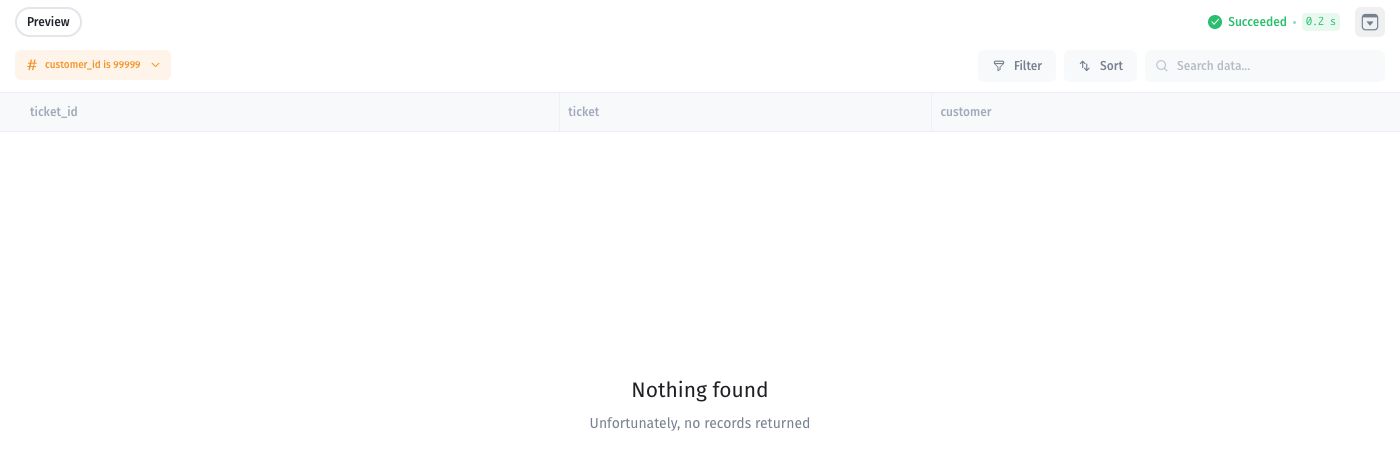
Every returned row should have the requested customer ID. An empty result can be valid if that customer has no orders.

<figure><img src="https://3448227606-files.gitbook.io/~/files/v0/b/gitbook-x-prod.appspot.com/o/spaces%2F-LQ08RFAKZvFADEiXKFy%2Fuploads%2F5vGLukrCEGbV3uk3ADKI%2FS25b-sql-empty-result.jpg?alt=media" alt="Succeeded SQL request with customer_id 99999 and no returned records"><figcaption><p>The related Tickets–Customers join succeeds but returns no rows for customer_id 99999. Check the input and matching data before treating an empty result as an error.</p></figcaption></figure>

This empty-result screenshot uses the [ticket/customer join example](/user-guide/synced-tables/join-data-from-multiple-sources.md), rather than the standalone lookup above.

Bind the saved input to an appropriate app value when using the query in a component. A filter is not a substitute for permissions.

For editor controls, see [SQL Query Builder](/user-guide/sql-queries-and-api-requests/sql-query-builder.md). For existing queries using older input syntax, see [Write and test a SQL query](/user-guide/sql-queries-and-api-requests/make-a-sql-query.md).


---

# Agent Instructions
This documentation is published with GitBook. GitBook is the documentation platform designed so that both humans and AI agents can read, navigate, and reason over technical content effectively. Learn more at gitbook.com.

## Querying This Documentation
If you need additional information that is not directly available in this page, you can query the documentation by asking a question.

Perform an HTTP GET request on the following URL with the `ask` and `goal` query parameters:

```
GET https://docs.jetadmin.io/user-guide/sql-queries-and-api-requests/use-dynamic-sql-inputs.md?ask=<question>&goal=<user_goal>
```

`ask` is the immediate question: it should be specific, self-contained, and written in natural language.
`goal` is what the user is ultimately trying to achieve, the reason they need the answer. Sharing it helps GitBook give you a better, more relevant answer. A goal is most helpful when it describes the outcome the user wants rather than restating the question. For example, with `ask=how do I create an API token`, a goal like `automate deployments from our CI pipeline` lets GitBook tailor the answer to that use case.

The response will contain a direct answer to the question and relevant excerpts and sources from the documentation.

Use this mechanism when the answer is not explicitly present in the current page, you need clarification or additional context, or you want to retrieve related documentation sections.