> For the complete documentation index, see [llms.txt](https://docs.jetadmin.io/llms.txt). Markdown versions of documentation pages are available by appending `.md` to page URLs; this page is available as [Markdown](https://docs.jetadmin.io/user-guide/data-sources/connect-your-first-data-source.md).

# Connect your first data source

Connect an existing source and check that Jet Admin can access the records your app needs.

## Before you start

Choose a provider in [Data Sources](/user-guide/data-sources.md). You need an account or credentials with access to the intended database, base, spreadsheet, or service. Decide whether the app needs to read data, update it, or call actions.

## Connect the source

1. Open **Data** and select **Add Resource**.
2. Select your provider.
3. Follow its connection guide to sign in or enter credentials. Select the database, tables, or files when prompted.
4. If offered a connection mode, choose direct access or a sync connection. See [Synced tables](/user-guide/synced-tables.md).
5. Complete **Add Resource** and open the resulting resource.
6. Select a table or collection. For action-based resources, select an available action instead.

### Example: connect a public REST API

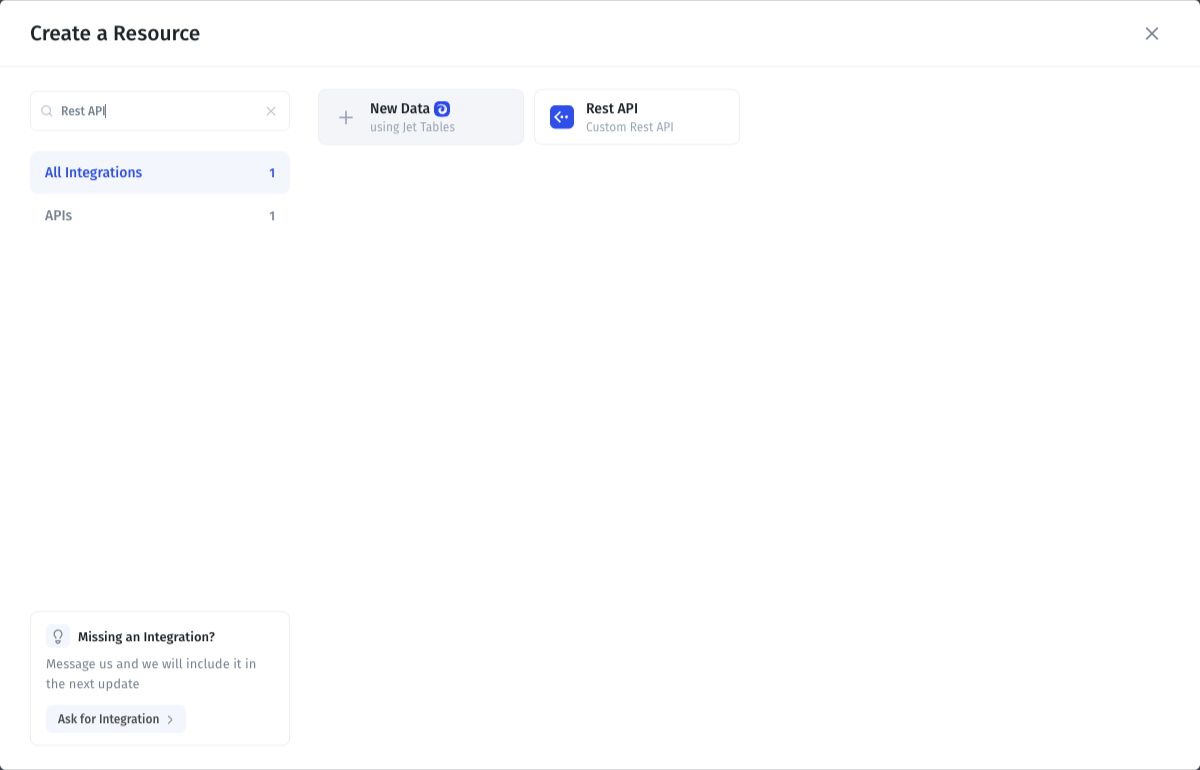
Search for **Rest API** in the resource picker.

<figure><img src="https://3448227606-files.gitbook.io/~/files/v0/b/gitbook-x-prod.appspot.com/o/spaces%2F-LQ08RFAKZvFADEiXKFy%2Fuploads%2Fgi3xscy2rfU1NC7Xqbxt%2FS01b-rest-api-provider.jpg?alt=media" alt="REST API provider search result"><figcaption><p>Select Rest API from the filtered resource picker.</p></figcaption></figure>

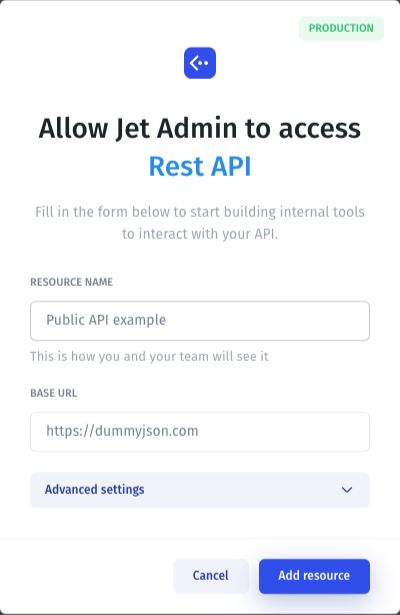
Enter a descriptive resource name and the base URL. This example uses the [DummyJSON sample API](https://dummyjson.com/docs/users), which provides fictional records and needs no credentials for this read request.

<figure><img src="https://3448227606-files.gitbook.io/~/files/v0/b/gitbook-x-prod.appspot.com/o/spaces%2F-LQ08RFAKZvFADEiXKFy%2Fuploads%2Fdh2p3ffjW6fWL81iUNdT%2FS01c-rest-api-connection-form.jpg?alt=media" alt="REST API setup with a resource name and https://dummyjson.com base URL"><figcaption><p>Enter the name and API base URL, then select Add resource when ready.</p></figcaption></figure>

To reproduce the record list below, configure a GET request to `/users?limit=2&select=id,firstName,lastName` and use the transformation in [Transform API responses](/user-guide/sql-queries-and-api-requests/api-builder/transform-api-responses.md). The connection form illustrates the name **Public API example**; the saved resource in the next screenshot is named **Documentation API demo**.

## Verify the connection

Compare one known record with the source, including its identifier and a field value. Check that the expected fields appear. For a tool or action, provide the required inputs and inspect the response.

<figure><img src="https://3448227606-files.gitbook.io/~/files/v0/b/gitbook-x-prod.appspot.com/o/spaces%2F-LQ08RFAKZvFADEiXKFy%2Fuploads%2FpZiEk8Ogt360IftNWaxb%2FS02-connected-api-records.jpg?alt=media" alt="API Users collection showing Emily Johnson ID 1 and Michael Williams ID 2"><figcaption><p>The public API example returns two records with their IDs. This verifies read access.</p></figcaption></figure>

If your app needs to write data, test one change on a demo record and confirm the result in the source. A successful read does not establish write access.

## Troubleshooting

| Symptom                        | Check                                                                    |
| ------------------------------ | ------------------------------------------------------------------------ |
| Sign-in or connection fails    | Account, credentials, endpoint, and network access.                      |
| A table or file is missing     | Granted access and resource selection.                                   |
| Records are missing            | Selected view, filters, and pagination.                                  |
| A newly added field is missing | [Sync schema changes](/user-guide/synced-tables/sync-schema-changes.md). |

Continue with [Manage app data](/user-guide/data.md) or [SQL queries and API requests](/user-guide/sql-queries-and-api-requests.md).


---

# Agent Instructions
This documentation is published with GitBook. GitBook is the documentation platform designed so that both humans and AI agents can read, navigate, and reason over technical content effectively. Learn more at gitbook.com.

## Querying This Documentation
If you need additional information that is not directly available in this page, you can query the documentation by asking a question.

Perform an HTTP GET request on the following URL with the `ask` and `goal` query parameters:

```
GET https://docs.jetadmin.io/user-guide/data-sources/connect-your-first-data-source.md?ask=<question>&goal=<user_goal>
```

`ask` is the immediate question: it should be specific, self-contained, and written in natural language.
`goal` is what the user is ultimately trying to achieve, the reason they need the answer. Sharing it helps GitBook give you a better, more relevant answer. A goal is most helpful when it describes the outcome the user wants rather than restating the question. For example, with `ask=how do I create an API token`, a goal like `automate deployments from our CI pipeline` lets GitBook tailor the answer to that use case.

The response will contain a direct answer to the question and relevant excerpts and sources from the documentation.

Use this mechanism when the answer is not explicitly present in the current page, you need clarification or additional context, or you want to retrieve related documentation sections.